Search the course
Press the magnifier at the top. Type at least two letters of a word or of a translation.
Search looks at the start of words: “bank” finds “banking”. Capital letters and accents make no difference.
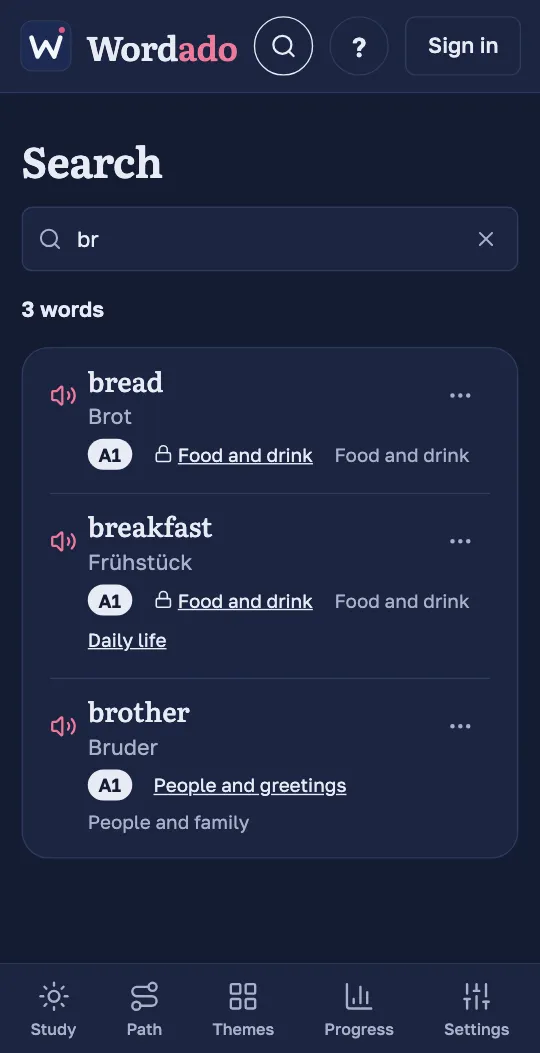
Read a result
A result shows the word, its translation, its level, its unit and its themes. Tap the unit to open it on the Path.
Learn a word now
Open the ⋯ menu of a word you have not started and choose “Learn this word”. The word comes first among your new words. “Don’t learn this word” takes it back.
Set a word aside
In the same menu, “I know it” and “Not now” set a word aside. Both do the same: the word is not taught, not reviewed and not counted in your progress. A word marked “Not now” does not return by itself.
During a session the choices are in the ⋯ menu on the card, before you answer.
Bring a word back
Open Settings, then “Words set aside”, and press “Bring back” next to the word. It returns with the progress it had.
Tip: Without an account, search covers only the words of the demo.